

CASE STUDY · LPI · 2024–2025
Ad System
Re-Architecture
Our Google Ad Manager setup hadn’t changed since 2011, and it hit a hard limit that stopped new ads from launching. I rebuilt how we traffic ads and protected $7.5M in ad revenue growth.
Yellow, orange, pink: order, line item, ad, the colors on my Miro boards.
MY ROLE
Product Design Manager, acting as product owner and subject-matter expert for Google Ad Manager
TIMEFRAME
Cap first hit in late Q3 2024; the rebuild ran mostly late Q2 through Q3 2025
TEAM
Me, with ad ops, the ad design team, sales and development
PLATFORM
Google Ad Manager, Parishes Online (POL), My Community Online (MCO), Salesforce, Miro
THE PROBLEM
Every ad sold became another line item
LPi sells digital ads on church listing pages and in other placements on Parishes Online (POL) and My Community Online (MCO). MCO is the community version of POL: it runs on the same data, with no Catholic references. In Google Ad Manager, every ad sold was set up as its own targeted line item with a single creative. That method dated from 2011, and it hadn’t kept up with two years of fast digital growth.
I was working with the ad design team on internal processes when, in late Q3 2024, new campaigns suddenly stopped going live. We had hit Google Ad Manager’s hard cap of 61,000 line items, and nobody at LPi knew the platform well enough to say why. I didn’t either, yet. So I learned it.
I found that every ad was targeted twice: once on its line item and once on its creative. Removing the duplicate level brought line items with targeting from the 61,000 cap down to about 44,000, and campaigns launched again.
That bought time, not a fix. With one line item for every ad sold, we would hit the cap again soon, and next time there would be no duplicate targeting to remove. I knew we had to act. The audit that followed turned up more:
Line items used one at a time. One line item per ad sold, one creative per line item.
No naming conventions or organization for those line items.
Tangled placements and ad units. Some creatives were assigned straight to ad units, others to placements, and some overlapped through targeting.
A system shaped by guesswork. Over the years, teams had changed it without knowing how it worked inside.
Ads that under-delivered. Hundreds of ads had never fully delivered as promised, often because of manual errors in how they were set up.
MY ROLE
Learning the platform, then leading the fix
As Product Design Manager, I took on the role of product owner and subject-matter expert for Google Ad Manager.
Learned Google Ad Manager from scratch, since no one at LPi had real working knowledge of it.
Led the system audit, and found the duplicate targeting that got campaigns launching again.
Designed the new trafficking model, the placement cleanup and the naming conventions.
Built a phased roadmap with engineering, sales and support, compatible with the rebuild of the platform that serves the ads.
Won leadership buy-in with mockups, analytics and a risk-mitigation plan.
Set new best practices with ad ops and sales, and wrote scripting requirements with development.
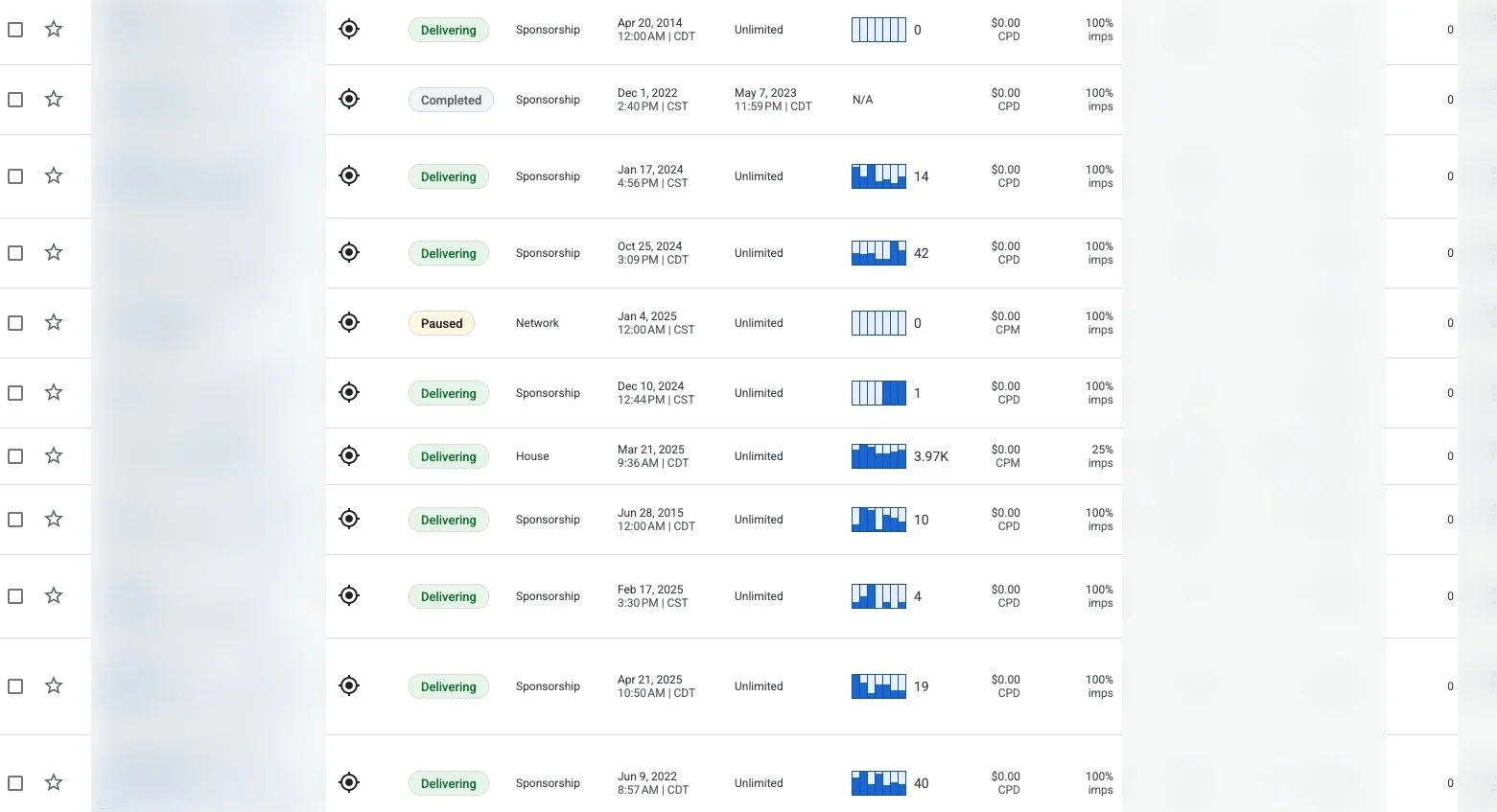
The legacy setup in Google Ad Manager: every ad sold got its own targeted line item and a single creative. Advertiser names and stats are blurred.

THE FORECAST
44 weeks to a dead stop
After the first fix, I counted how fast line items were coming back. On April 2, 2025, there were 43,400. The team had added 488 in the week before, about 400 new ads a week. At that pace, the remaining 17,600 would be gone in about 44 weeks, halting new ads around January or February 2026. The rebuild kicked off that spring, and most of the work ran from late Q2 through Q3 2025.

Line items in use on April 2, 2025, against the 61,000 cap. Each stripe in the remaining space is one week at about 400 new line items.
61,000
line item hard cap in Google Ad Manager
43,400
line items with targeting on Apr 2, 2025
488
added in one week, Mar 25 to Apr 2
44
weeks left at that pace
$6M
a year in ad revenue at risk when the cap hit
2011
the last time the setup changed
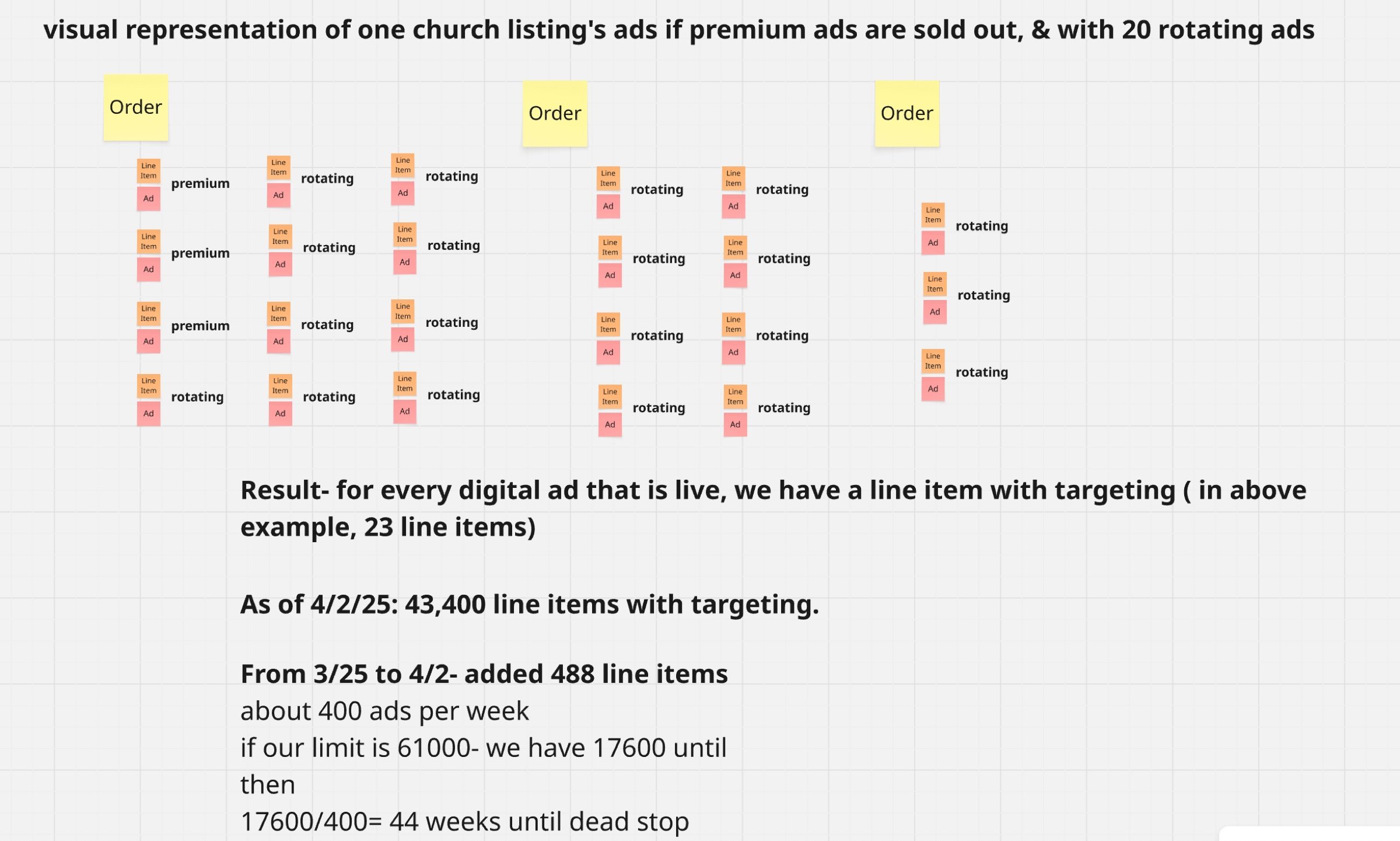
My Miro board. One church listing with its premium spots sold out and 20 rotating ads needed 23 line items. The math underneath set the deadline.
STRATEGY
Fix the structure, not just the count
Restructure trafficking
Collapse redundant line items with template-based, modular logic: one line item per placement instead of one per ad.
Plan for regional search ads
A second system for regional, search-driven placements, so the next product line starts on the new structure.
Match how ads are sold
Separate trafficking logic for ads sold on a church’s listing, search- and location-based ads, and national ads.
Organize by placement
Reporting, inventory and transparency organized by placement within each account’s order.
New inventory for local sales
A new digital ad inventory system for the local ads our sales team sells.
Two rebuilds, one roadmap
The platform that serves the ads was being rebuilt at the same time. A phased roadmap kept the two compatible and matched engineering bandwidth, sales readiness and support.
THE NEW MODEL
One order per account, one line item per placement
Premium spots are exclusive, so each keeps its own line item. Rotating spots are shared: each rotating size gets one line item, and every ad sold into that spot becomes a creative on it. Google Ad Manager then rotates them evenly, which the old setup couldn’t do.
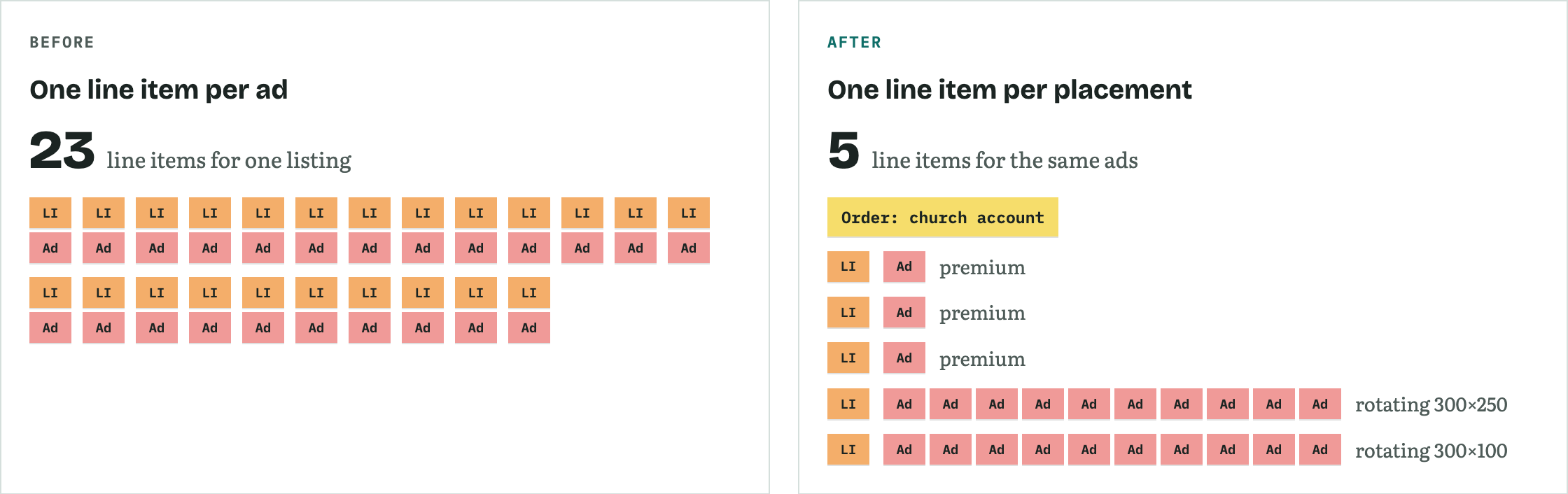
One church listing with three premium ads and 20 rotating ads: 23 line items before, 5 after.
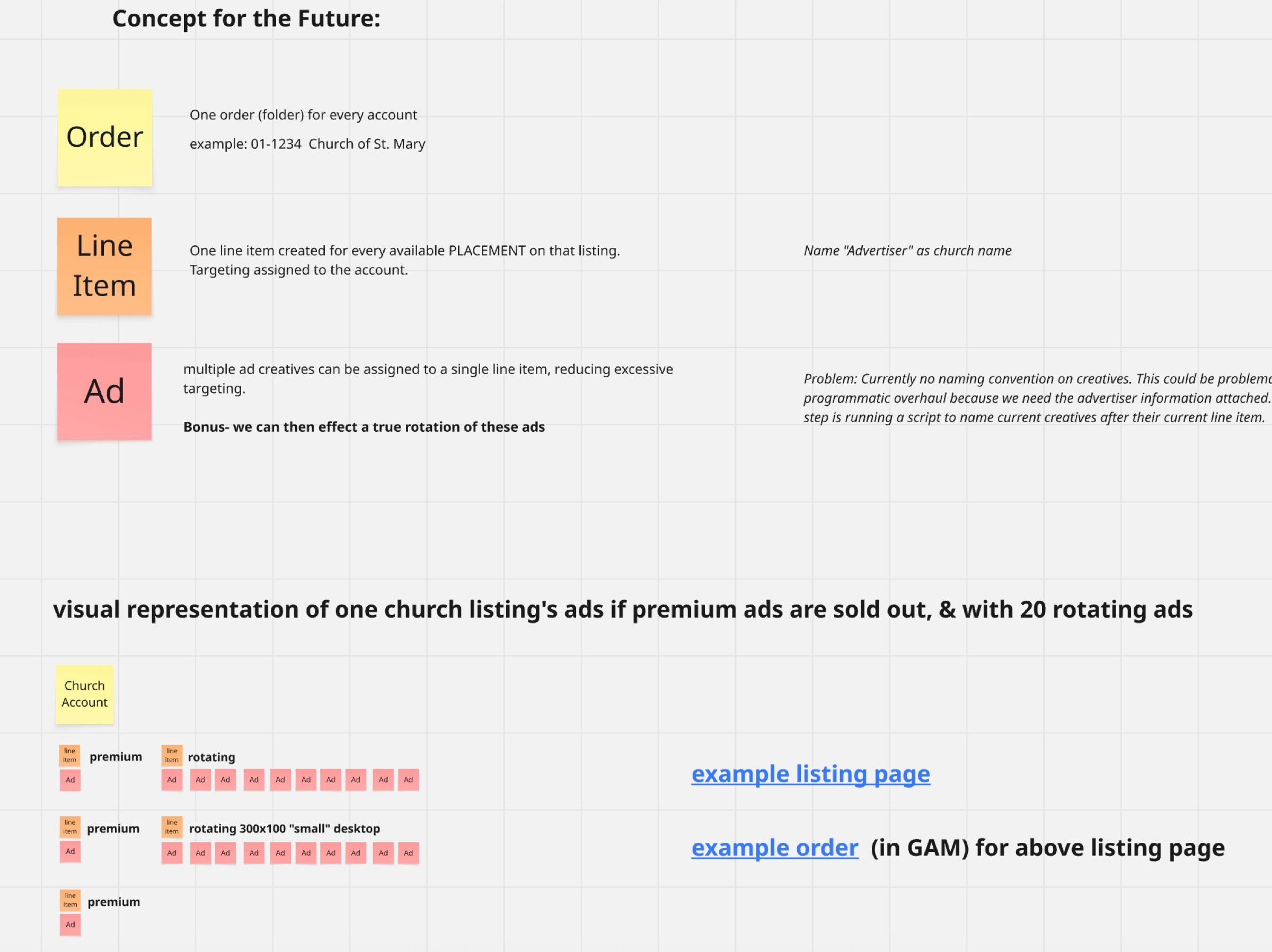
The concept from my Miro board, with the same listing worked through: three premium line items and two rotating line items holding ten ads each.
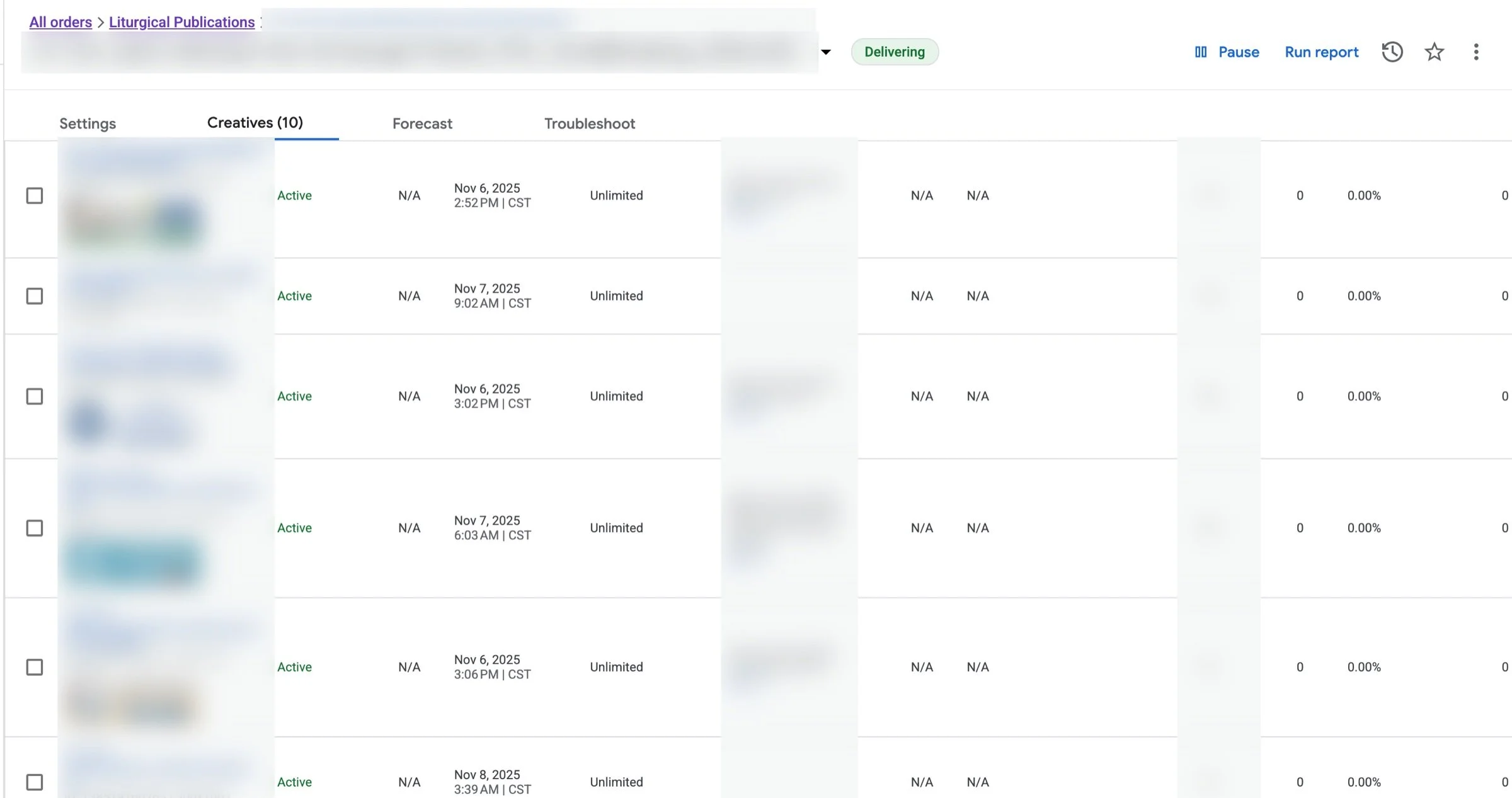
A rotating line item today, with ten advertisers’ creatives on it. Shared, non-exclusive spots are what keep the system sustainable. Advertiser details are blurred.
MAPPING AND CLEANUP
Untangling placements and ad units
Before moving a single ad, I mapped every placement and ad unit on both platforms, in its current and future state. Once each placement pointed to exactly one ad unit, we could move line items to the new structure one placement at a time and troubleshoot as we went.
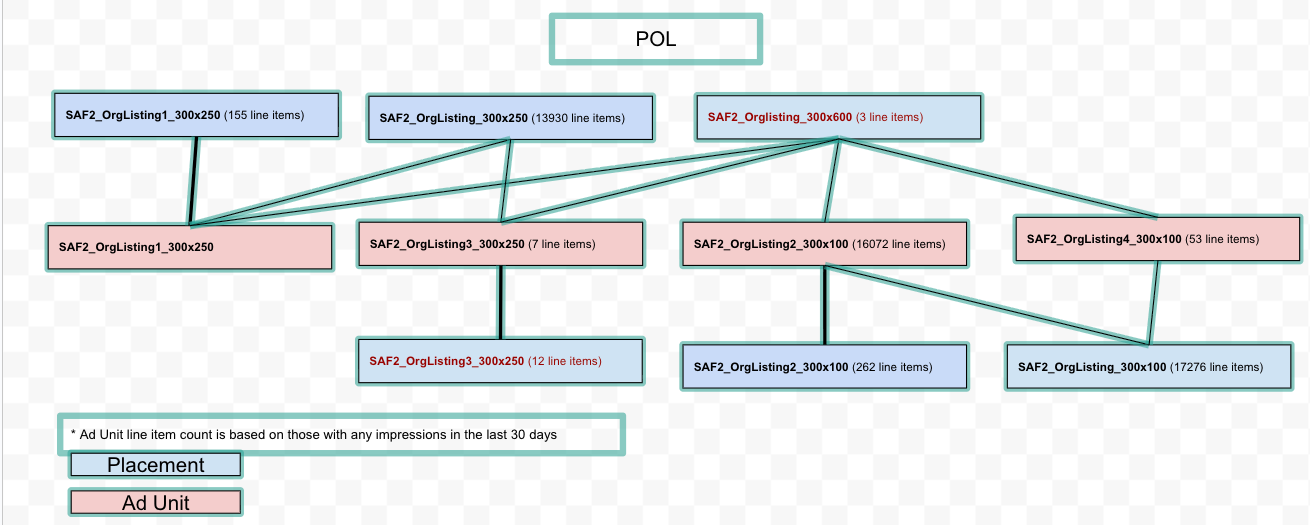
BEFORE
POL listing placements (blue) feeding several ad units (pink) at once. Line item counts are from the last 30 days of impressions at the time. The ad design team had been manually configuring each ad, and the naming conventions and tangled placements were causing confusion and more errors.
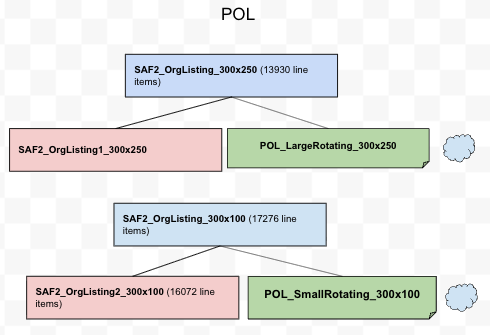
AFTER
The same placements, each mapped to one new ad unit (green) under the new naming convention. After testing, we were able to retire the old placement names in favor of a naming convention the ad operations team could nderstand.
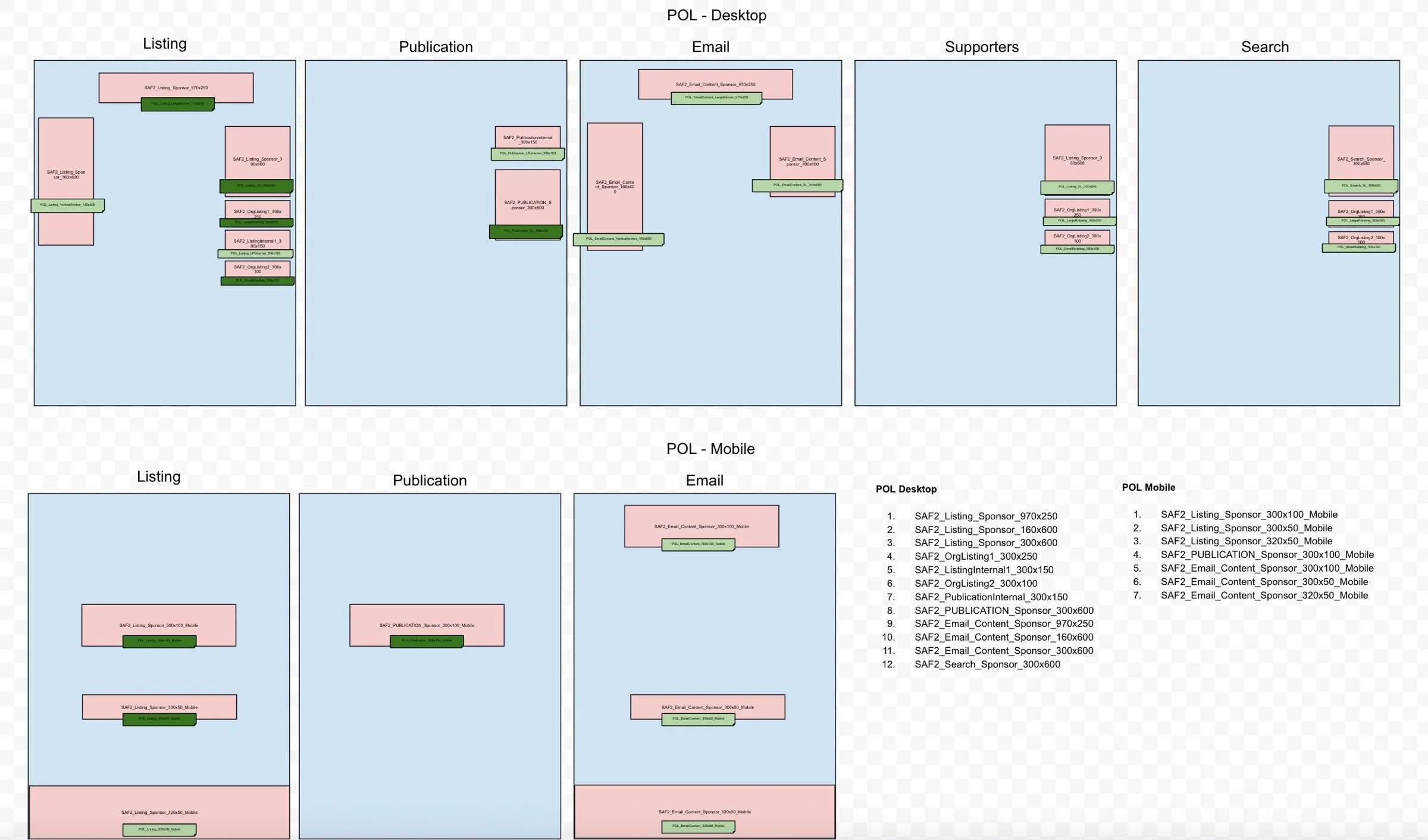
Every POL placement, on desktop and mobile, mapped by page.
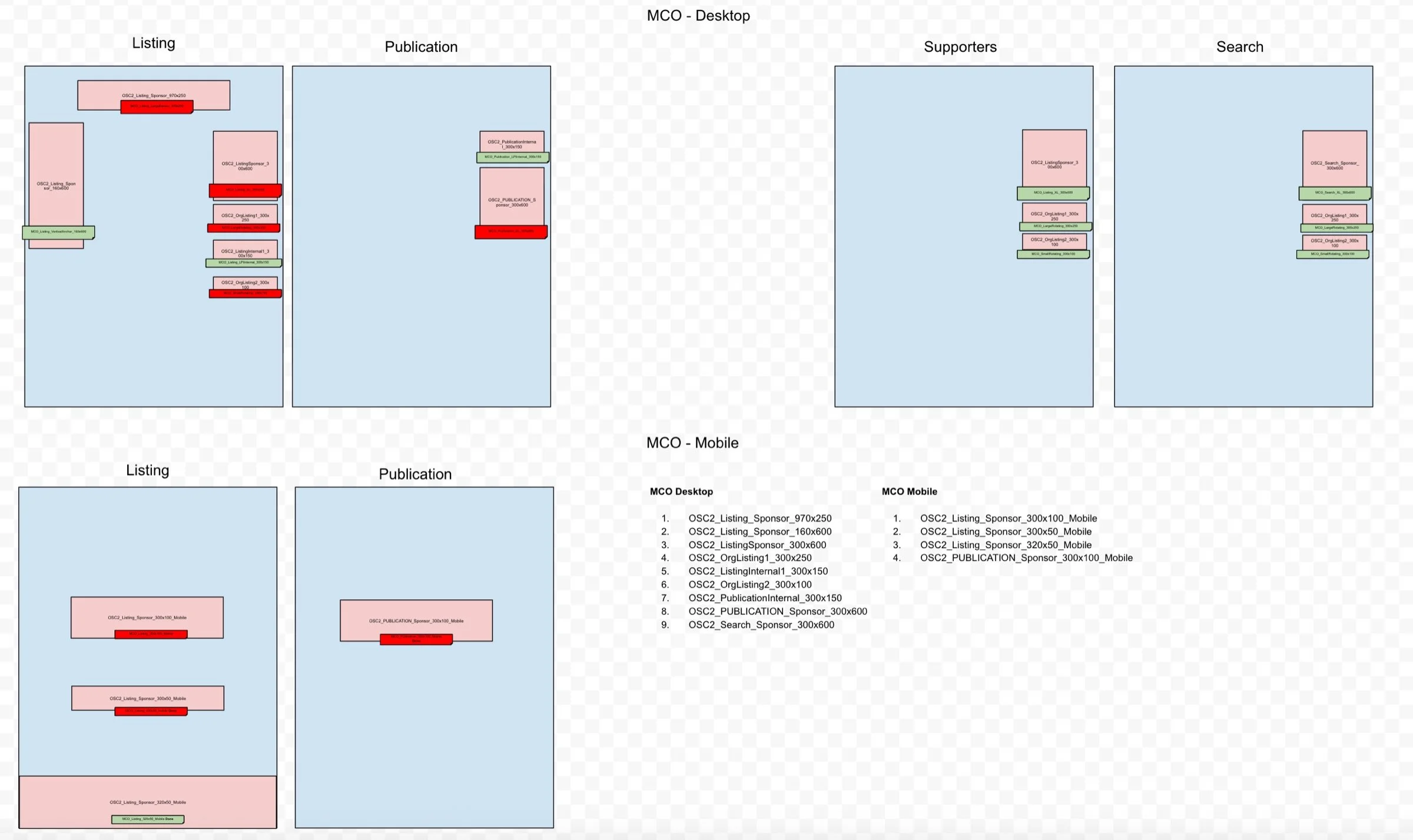
The same map for MCO. The plans changed as both platforms were rebuilt.
EXECUTION
Migrating live ads without stopping them
I worked with development on the scripting requirements for the migration, and with ad ops and sales on new best practices for setting up ads and launching campaigns. Regular demos, updates and documentation kept stakeholders aligned.
Export the existing historical impression and click data.
Rename existing creatives after the line items they currently belong to.
Work out which orders to create from the line items’ church IDs.
Create the orders.
Work out which line items to create from each combination of church ID and placement.
Create the new line items with the new naming scheme, inside the right orders.
Move creatives to the new line items by matching placement.
Archive the old line items.
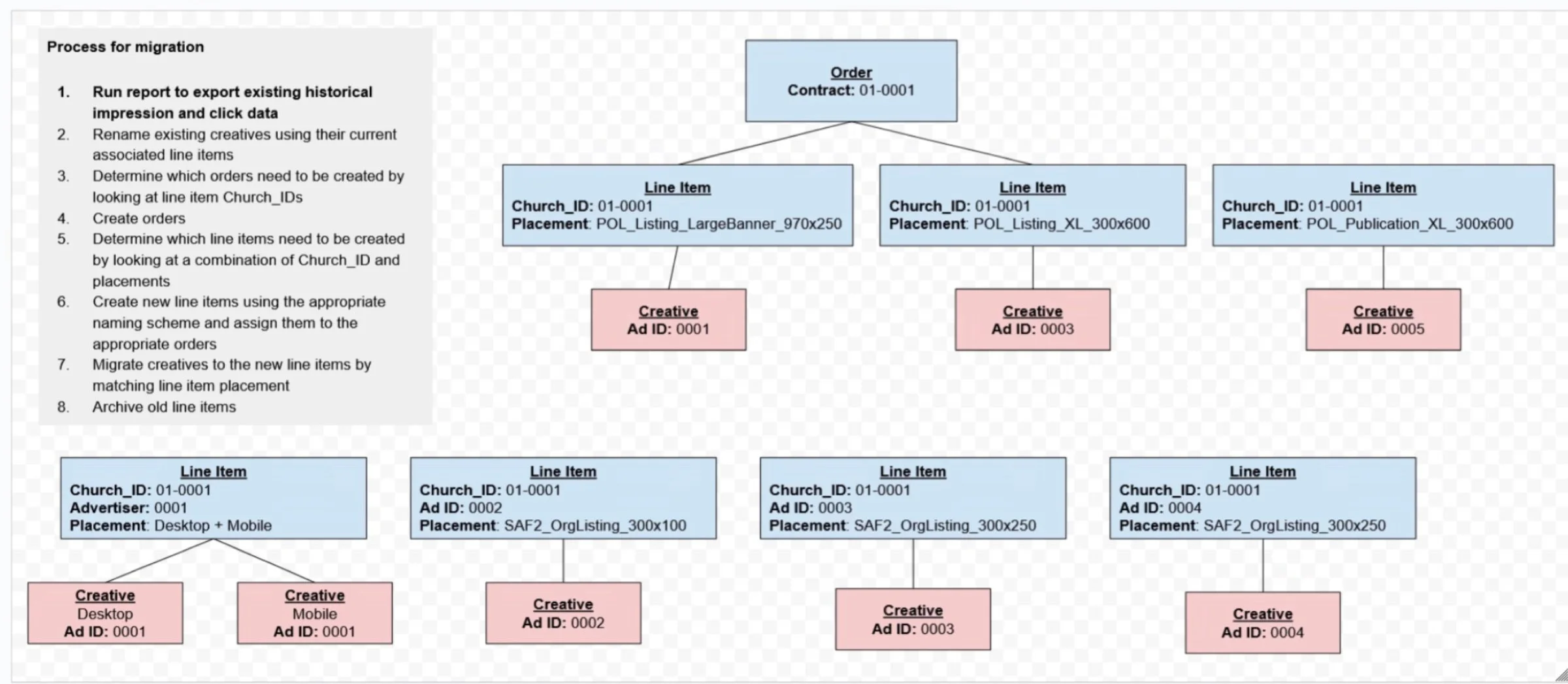
The migration plan: one order per contract, a line item per placement, and the creatives under each. IDs are examples.
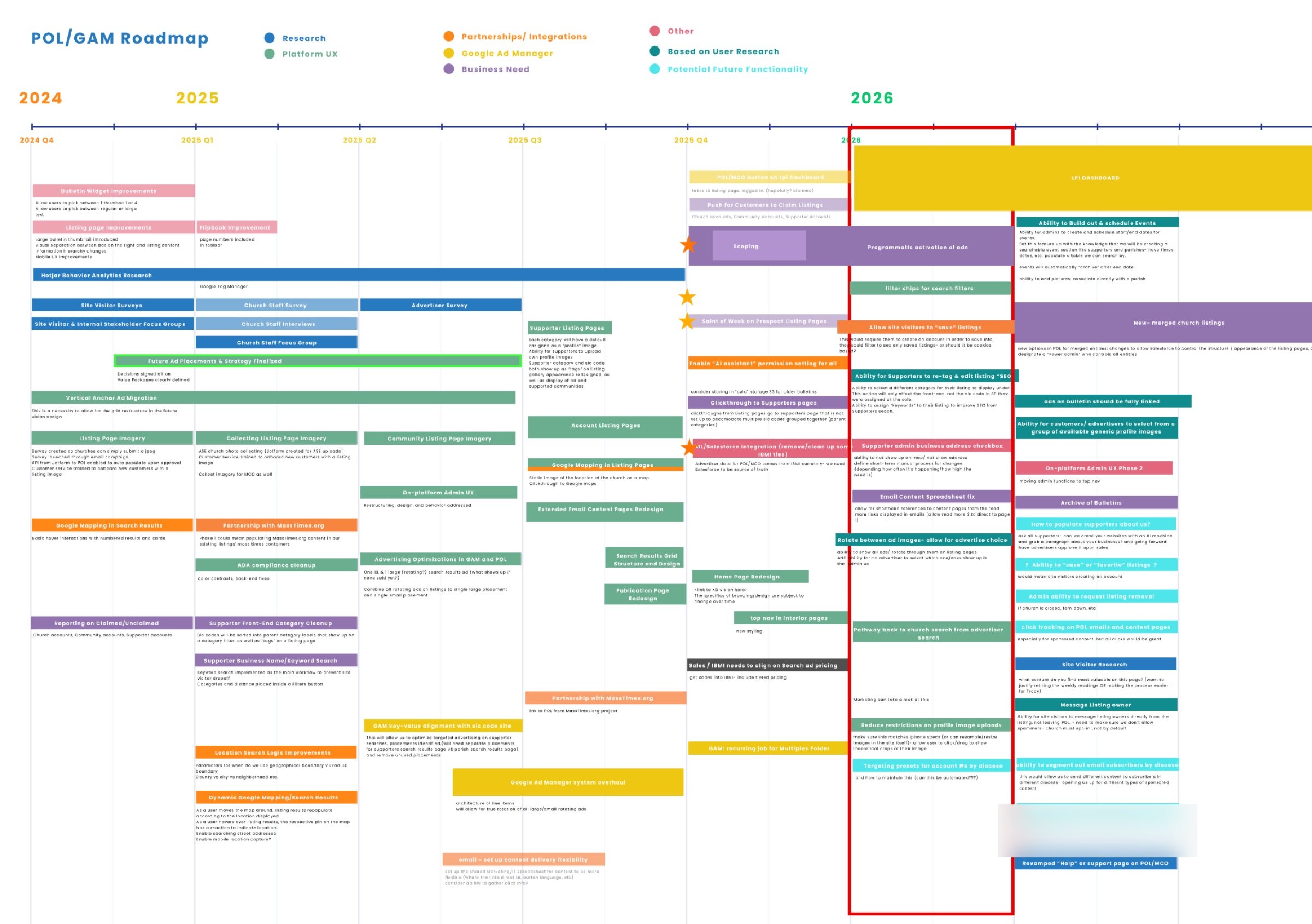
The POL/GAM roadmap, Q4 2024 into 2026. The Google Ad Manager overhaul ran alongside the platform rebuild. One internal note is blurred.
BUMPS ALONG THE WAY
What made it hard, and what we did
Nobody knew the platform
No one at LPi had real working knowledge of Google Ad Manager, including me at the start.
CHANGE I learned it, then wrote the trafficking logic and best practices down so the knowledge stays with the team.
Creatives had no names
A creative only made sense through its line item. Moving it would have lost track of whose ad it was.
CHANGE A script renamed every creative after its current line item before anything moved.
Ads had to keep running
Thousands of paid ads were live, so the migration couldn’t take the system down.
CHANGE One placement at a time, with room to troubleshoot after each.
History lived in the old line items
Years of impression and click data sat on line items we planned to archive.
CHANGE The migration starts by exporting that data.
Two rebuilds at once
The platform that shows the ads was being rebuilt at the same time as the system that serves them.
CHANGE One phased roadmap kept the two compatible.
Ads that fit no pattern
Our scripts flagged hundreds of ads that didn’t fit any of our solutions, often because of manual setup errors.
CHANGE One-offs were fixed by hand. When we could identify error patterns, such as wrong targeting or naming, we’d create a script to fix it through the Google Ad Manager API.
RESULTS
Room to grow, and a system people understand
Line items
Before: One per ad sold
Now: One per placement per account
Example listing
Before: 23 line items for 3 premium and 20 rotating ads
Now: 5 line items for the same ads
Rotating spots
Before: One creative per line item, no true rotation
Now: Many creatives per line item, rotated by Google Ad Manager
Organization
Before: No naming conventions
Now: One order per account, named by contract number and church
Placements
Before: Placements tangled with several ad units
Now: One ad unit per placement, under a new naming convention
Room under the cap
Before: About 44 weeks, with a halt projected for Jan/Feb 2026
Now: 33,164 line items with targeting, stable as sales grow
Ad delivery
Before: Hundreds of ads never fully delivered
Now: Scripts flag ads that fit no pattern; recurring errors are fixed in bulk through the Google Ad Manager API
Weekly setup
Before: Hundreds of ads configured, activated and deactivated by hand each week
Now: About 56 ads a day sync from Salesforce, saving 3 minutes per ad
$7.5M
revenue growth protected, on the path from $6.5M in 2025 to $14M projected for 2028
33,164
line items with targeting today, down from the 61,000 cap and stable
$32K
in outside costs avoided by doing the work in-house
~56
ads a day synced automatically from Salesforce
15
hours of designer time saved per week
The ad business kept running. Resolving the system limit prevented a total stop on new campaigns, projected for January or February 2026.
Data we can trust. The new structure is set up for scale and for reliable reporting and analytics.
Growth without the cliff. A trafficking strategy that scales with sales instead of running into the cap.
A new tool for local sales. A new digital ad inventory tool launched, improving coordination between sales and operations.
Trust across teams. Structured communication and transparency between departments built stakeholder confidence.
Set up for what’s next. A framework for ongoing platform improvements and the future regional inventory launch.
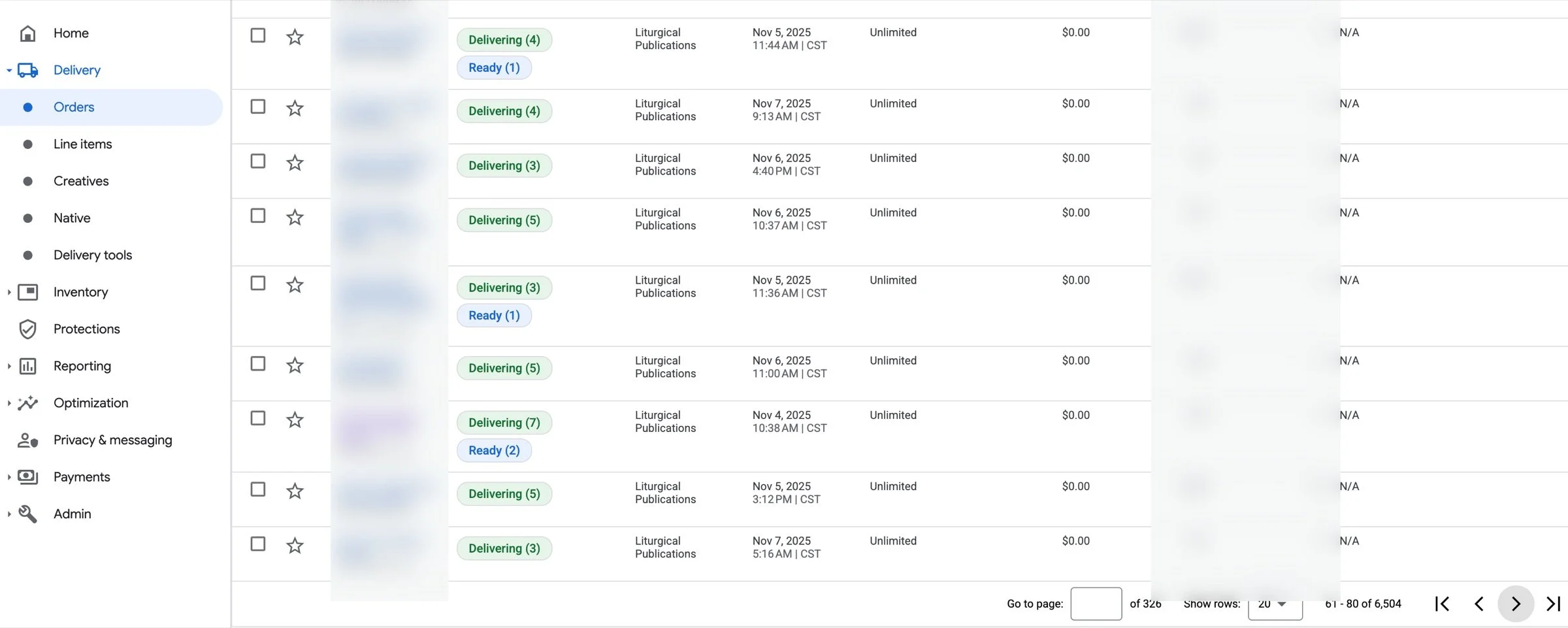
Orders today: each customer account has its own order, 6,504 in the list. Order names and stats are blurred.
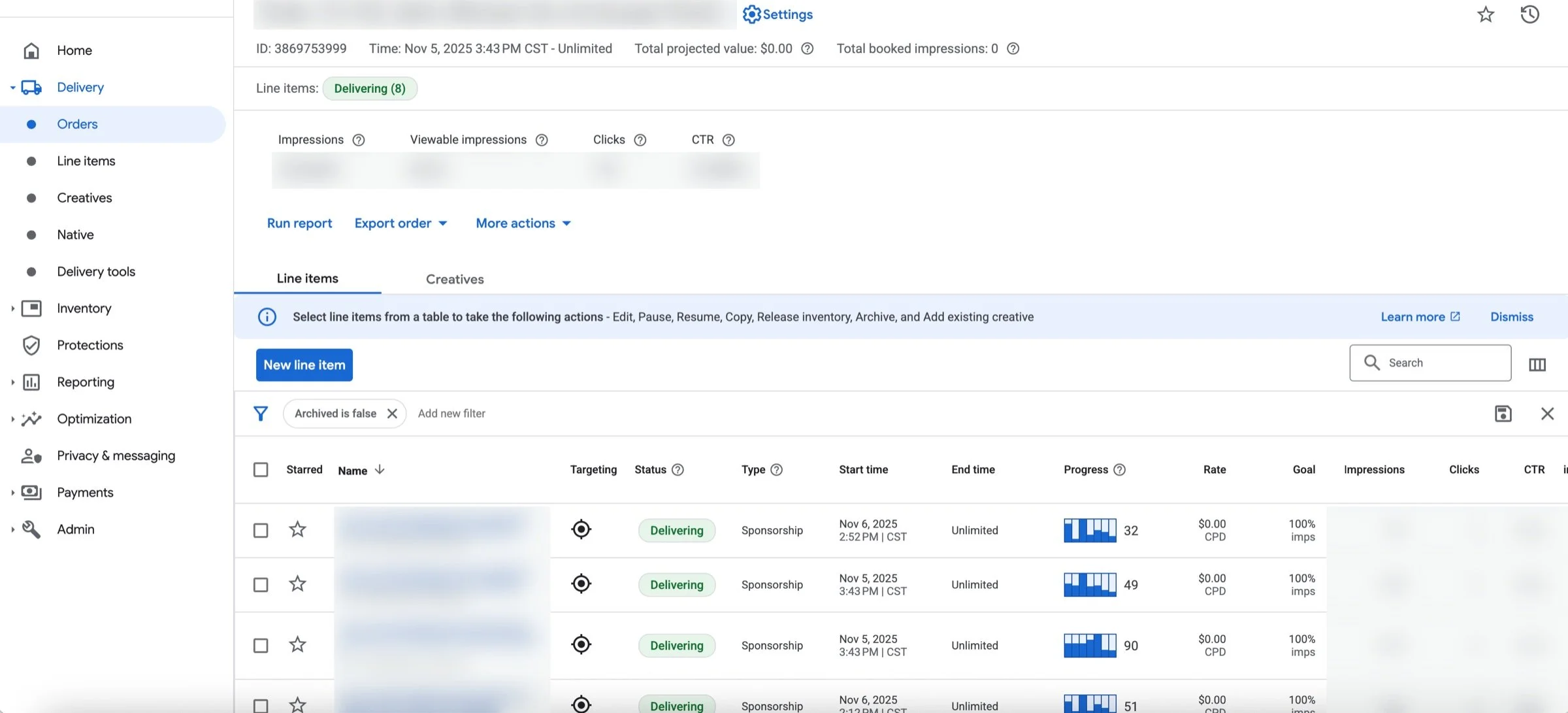
Inside one order: eight line items, one for each placement with ads running on that listing.
CONCLUSION
A system failure became a foundation for growth
What began as a technical limit in Google Ad Manager revealed deeper problems across sales, ad ops and platform design, built up over a decade of one-off decisions. Treating it as a systems problem, not a tooling problem, is what let me align the teams, redesign the core trafficking logic, and bring clarity and trust back to the platform.
The cap was the symptom. The structure was the problem.
Do the math early. A weekly count turned an emergency into a deadline the business could plan around.
Fix the structure, not the number. The first fix bought time. The model change removed the cliff.
Make the system readable. Naming conventions and one ad unit per placement mean ad ops can reason about what they see.
Move in small, safe steps. One placement at a time kept paid ads running throughout.
In LPi’s ROI review, the retrafficking project is credited with protecting $7.5M: the path from $6.5M in ad revenue in 2025 to a projected $14M in 2028. The standard structure and naming also made the Salesforce automation possible, cutting the room for human error and setting up future automations.
Ad System Re-Architecture · Megan Russell · Product Design Manager